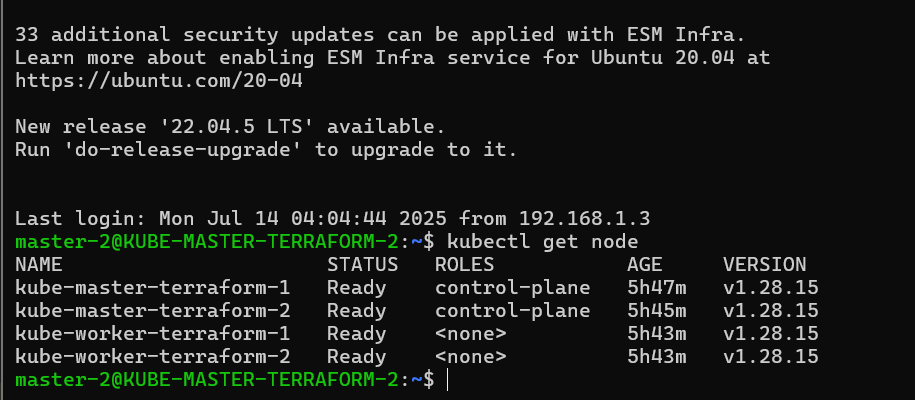
Spinning up a fresh Kubernetes cluster is a multi-step process that quickly becomes tedious and error-prone when repeated often. Tasks like enabling IP forwarding, disabling swap, configuring sysctl parameters, installing Kubernetes components, initializing the control plane, and manually joining nodes can become a serious time sink—especially in a homelab or testing environment.
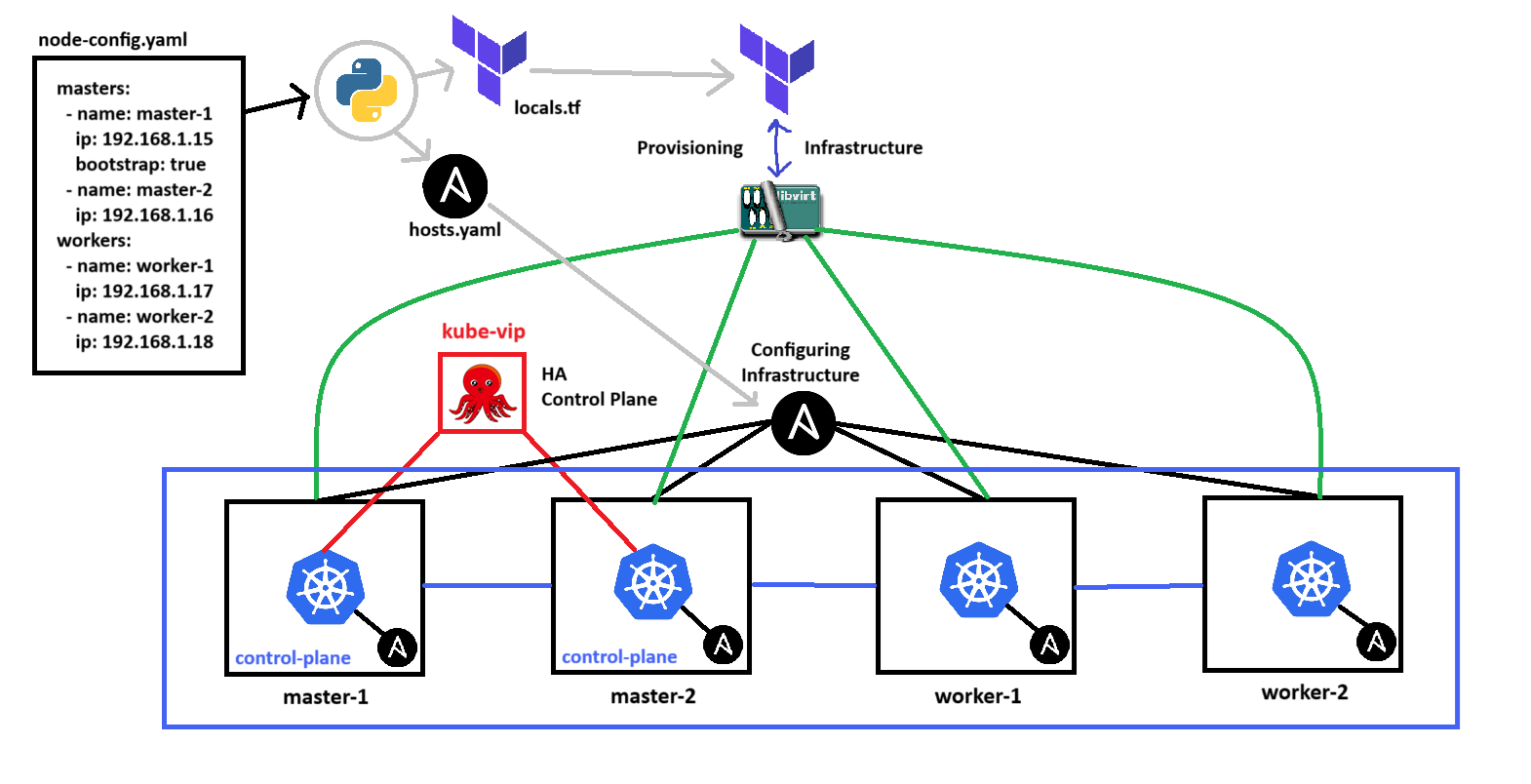
To streamline this process, I built a reproducible infrastructure setup using Terraform, Ansible, and Kube-VIP on a Libvirt-based virtualized environment. This setup lets me spin up a multi-master HA Kubernetes cluster with minimal manual effort, enabling consistent and reliable deployments across environments.
Take a look at the repository right here: Github Repo
Infrastructure as Code
What and Why?
Infrastructure as Code (IaC) is the practice of managing infrastructure—networks, virtual machines, load balancers, and other components—through machine-readable configuration files instead of manual processes. The key benefits are reproducibility, version control, and automation.
In this project, I adopted a GitOps-friendly approach using Terraform to define the core infrastructure required for a High Availability Kubernetes cluster hosted on Libvirt. The setup includes:
- VM definitions for control plane and worker nodes
- Network interfaces for internal cluster communication
- Disk images and cloud-init integration for first-boot automation
Why IaC?
- Manual VM creation and configuration becomes error-prone and inconsistent over time
- I wanted the ability to rebuild the entire cluster or scale it by simply modifying a few variables and reapplying the plan
- Using declarative code aligns with best practices in modern DevOps workflows and enables auditability and collaboration (via Git)
Additionally, using Terraform sets the stage for future extensibility:
- I can easily plug in cloud providers (e.g., AWS or GCP) using the same core logic
- I plan to integrate this setup with CI/CD pipelines for automated infrastructure deployments
- Terraform outputs (e.g., IPs, hostnames) are fed directly into Ansible for post-provision configuration—bridging IaC with configuration management
By treating infrastructure the same way we treat application code, I gain predictability, scalability, and the ability to iterate fast without losing control.
Libvirt as a Virtualization Platform Toolkit
Libvirt wasn’t selected because of any specific technical superiority—it was simply the first virtualization toolkit I used when building my homelab.
- That said, Libvirt ended up being a solid fit for this project, because:
- It runs directly on Linux with no cloud dependencies
- It supports headless, scriptable VM management (via
virsh,virt-install, and Terraform’s Libvirt provider) - It integrates well with cloud-init and custom networking setups
- It provides full control over disk images, virtual NICs, and resources
I leaned into this familiarity instead of exploring something new like Proxmox or VMware, because my priority was speed, reproducibility, and leveraging existing knowledge. By keeping the platform constant, I could focus more on higher-level automation: Terraform provisioning, Ansible bootstrapping, and Kubernetes orchestration.
- This foundation lets me:
- Benchmark against other platforms using the same IaC logic
- Abstract infrastructure logic from the virtualization backend
- Potentially swap out Libvirt for remote cloud providers with minimal refactor
Libvirt also manages volumes like other virtualization tools do, I used that to my advantage by downloading the ISO and importing it as a volume once to libvirt, this introduces an efficient environment where I just need to reuse the ISO for provisioning multiple instances, reducing the installation time by 90%.
- The steps are documented below:
- Installing the image once (Ubuntu 20.04)
wget https://cloud-images.ubuntu.com/focal/current/focal-server-cloudimg-amd64.img -O focal-20.04-base.qcow2 - Import to Libvirt once
virsh vol-create-as default focal-20.04-base.qcow2 10G --format qcow2 --prealloc-metadata
virsh vol-upload --pool default focal-20.04-base.qcow2 focal-20.04-base.qcow2
- Installing the image once (Ubuntu 20.04)
I also used this Terraform provider in order to interact with the libvirt api dmacvicar/libvirt
Cloud Init & Network Config Templates
Since the IP and the init configuration cannot be defined directly in the domain resource in the Terraform configuration.
I used cloud-init and network-config templates and injected the parameters inside data template block in Terraform, here are the templates:
cloud-init.tmplhostname: ${hostname} users: - name: ${vm_name} groups: sudo shell: /bin/bash sudo: ["ALL=(ALL) NOPASSWD:ALL"] ssh_authorized_keys: - [FIRST-SSH-PUBKEY] - [SECOND-SSH-PUBKEY] - ... ssh_pwauth: false disable_root: truenetwork-config.tmplversion: 2 ethernets: ens3: dhcp4: no addresses: [${ip_address}/24] gateway4: ${gateway} nameservers: addresses: [${dns}]template.tfdata "template_file" "master_user_data" { for_each = local.masters template = file("${path.module}/cloud-init/cloud-init.tmpl") vars = { hostname = each.value.hostname vm_name = each.value.vm_name } } data "template_file" "master_net_cfg" { for_each = local.masters template = file("${path.module}/network-config/network-config.tmpl") vars = { ip_address = each.value.ip_address gateway = each.value.gateway dns = each.value.dns } } data "template_file" "worker_user_data" { for_each = local.workers template = file("${path.module}/cloud-init/cloud-init.tmpl") vars = { hostname = each.value.hostname vm_name = each.value.vm_name } } data "template_file" "worker_net_cfg" { for_each = local.workers template = file("${path.module}/network-config/network-config.tmpl") vars = { ip_address = each.value.ip_address gateway = each.value.gateway dns = each.value.dns } }
Terraform for Infrastructure Provisioning
main.tf
The
main.tffile is used to define the providerterraform { required_providers { libvirt = { source = "dmacvicar/libvirt" version = "0.8.3" } } } provider "libvirt" { uri = "qemu:///system" }
locals.tf
The
locals.tffile is used to define configurations about the local variables used in the environment, we can see that the variable master holds information about all the master and its attributes, same as the workers.locals { masters = { "master-1" = { hostname = "KUBE-MASTER-TERRAFORM-1" vm_name = "master-1" ip_address = "192.168.1.15" gateway = "192.168.1.1" dns = "8.8.8.8" } "master-2" = { hostname = "KUBE-MASTER-TERRAFORM-2" vm_name = "master-2" ip_address = "192.168.1.16" gateway = "192.168.1.1" dns = "8.8.8.8" } } workers = { "worker-1" = { hostname = "KUBE-WORKER-TERRAFORM-1" vm_name = "worker-1" ip_address = "192.168.1.17" gateway = "192.168.1.1" dns = "8.8.8.8" } "worker-2" = { hostname = "KUBE-WORKER-TERRAFORM-2" vm_name = "worker-2" ip_address = "192.168.1.18" gateway = "192.168.1.1" dns = "8.8.8.8" } } }
outputs.tf
The
outputs.tffile prints out the information to the user, in this file I print out the IP’s that the user has configured as well as who the master and the worker claimed that IPoutput "master_ips" { value = { for k, v in local.masters : k => v.ip_address } } output "worker_ips" { value = { for k, v in local.workers : k => v.ip_address } }
resources.tf
The
resources.tffile defines all the resource needed to provision this entire infrastructure, the configuration below can be divided into multiple resources:- Network Resource
libvirt_network - Volume Resource
libvirt_volume - CloudInit Disk
libvirt_cloudinit_disk - Domain / VM
libvirt_domain
# Network Resource resource "libvirt_network" "bridged_network" { name = "k8s-bridge" mode = "bridge" bridge = "br0" } # Master Resources resource "libvirt_volume" "ubuntu_disk_master" { for_each = local.masters name = "${each.key}.qcow2" pool = "default" base_volume_id = libvirt_volume.ubuntu_base.id format = "qcow2" size = 10 * 1024 * 1024 * 1024 # 10 GiB } resource "libvirt_cloudinit_disk" "cloudinit_master" { for_each = local.masters name = "cloudinit-${each.key}.iso" pool = "default" user_data = data.template_file.master_user_data[each.key].rendered network_config = data.template_file.master_net_cfg[each.key].rendered } resource "libvirt_domain" "vm_master" { for_each = local.masters name = each.key memory = var.memory vcpu = var.vcpu disk { volume_id = libvirt_volume.ubuntu_disk_master[each.key].id } cloudinit = libvirt_cloudinit_disk.cloudinit_master[each.key].id network_interface { network_id = libvirt_network.bridged_network.id } console { type = "pty" target_port = "0" target_type = "serial" } graphics { type = "vnc" listen_type = "address" autoport = true } } # Worker Resources resource "libvirt_volume" "ubuntu_disk_worker" { for_each = local.workers name = "${each.key}.qcow2" pool = "default" base_volume_id = libvirt_volume.ubuntu_base.id format = "qcow2" size = 10 * 1024 * 1024 * 1024 } resource "libvirt_cloudinit_disk" "cloudinit_worker" { for_each = local.workers name = "cloudinit-${each.key}.iso" pool = "default" user_data = data.template_file.worker_user_data[each.key].rendered network_config = data.template_file.worker_net_cfg[each.key].rendered } resource "libvirt_domain" "vm_worker" { for_each = local.workers name = each.key memory = var.memory vcpu = var.vcpu disk { volume_id = libvirt_volume.ubuntu_disk_worker[each.key].id } cloudinit = libvirt_cloudinit_disk.cloudinit_worker[each.key].id network_interface { network_id = libvirt_network.bridged_network.id } console { type = "pty" target_port = "0" target_type = "serial" } graphics { type = "vnc" listen_type = "address" autoport = true } }- Network Resource
template.tf
The
templates.tffile selects the template used and specifies what variable is going to be useddata "template_file" "master_user_data" { for_each = local.masters template = file("${path.module}/cloud-init/cloud-init.tmpl") vars = { hostname = each.value.hostname vm_name = each.value.vm_name } } data "template_file" "master_net_cfg" { for_each = local.masters template = file("${path.module}/network-config/network-config.tmpl") vars = { ip_address = each.value.ip_address gateway = each.value.gateway dns = each.value.dns } } data "template_file" "worker_user_data" { for_each = local.workers template = file("${path.module}/cloud-init/cloud-init.tmpl") vars = { hostname = each.value.hostname vm_name = each.value.vm_name } } data "template_file" "worker_net_cfg" { for_each = local.workers template = file("${path.module}/network-config/network-config.tmpl") vars = { ip_address = each.value.ip_address gateway = each.value.gateway dns = each.value.dns } }
volumes.tf
The
volumes.tffile defines a base image that all VMs will clone during provisioning. This image is a pre-downloaded Ubuntu 20.04 QCOW2 disk, and it’s stored in Libvirt’s default storage pool.# volumes.tf resource "libvirt_volume" "ubuntu_base" { name = "focal-20.04-base.qcow2" pool = "default" lifecycle { prevent_destroy = true ignore_changes = [source] } }The image is manually imported into the Libvirt default pool ahead of time. Terraform expects it to exist already.
I deliberately used prevent_destroy = true to protect the base volume from accidental deletion during terraform destroy.
ignore_changes prevents Terraform from reacting to manual changes in the disk image source path, which is useful when maintaining a stable foundation across rebuilds.
variables.tf
The
variables.tffile is used to define inputs or a default value for a variable, this defines the amount of memory and vCPU to be used in all the VM’s, but locals should have been used to define the amount of attributes specifically.variable "vm_name" { description = "VM hostname" type = string default = "ubuntu-vm" } variable "memory" { description = "Memory in MB" type = number default = 2048 } variable "vcpu" { description = "Number of virtual CPUs" type = number default = 2 } variable "disk_size" { description = "Disk size in GB" type = number default = 16 } variable "ubuntu_cloud_image_20_04" { default = "https://cloud-images.ubuntu.com/focal/current/focal-server-cloudimg-amd64.img" }
Configuration Management
What and Why?
Once the infrastructure is provisioned, every node still needs to be properly configured before it can participate in the Kubernetes cluster. This includes:
- Setting system parameters (
sysctl, IP forwarding, disabling swap) - Installing container runtimes like
containerd - Installing Kubernetes components (
kubelet,kubeadm,kubectl) - Installing the correct version of kube-vip
- Initializing the control plane and joining the nodes
Doing all of this manually especially across multiple machines is repetitive, error-prone, and non-reproducible. That’s why I use Ansible as a configuration management layer.
Why Ansible?
- Agentless: It only requires SSH and Python on the target machines
- Declarative: I can define what the final state should look like
- Scalable: Works just as well for 3 nodes or 30
- Idempotent: Safe to re-run without breaking the cluster
In this project, Ansible takes over right after Terraform finishes. Terraform outputs an inventory file with IPs and hostnames, which Ansible uses to connect and run tasks based on each node’s role (master or worker).
The goal was to reduce the post-provisioning time from hours to just a few minutes, with consistent, version-controlled results. Combined with cloud-init for baseline OS setup, this Ansible role-based system gives me complete automation from VM boot to ready-to-use Kubernetes cluster.
Ansible, an SSH based Configuration Management tool
inventory
- The
inventorydirectory contains all the information needed by Ansible such as the hosts and the variables in the configuration
group_vars
all.yaml
The
all.yamlfile is used to define global variables that can used in the Ansible context, call it by using {{var_name}} to fetch it from this file. This is useful for dynamic configurations.kube_vip_address: 192.168.1.100 network_interface: ens3 kube_vip_version: v0.7.2 kubernetes_version: v1.28.0
hosts.yaml
The
hosts.yamlfile defines all the host that are going to be discovered as a node in the Ansible workspace, specific tags are attached to a host which gives the master tag-level control to call the nodes.all: children: masters: hosts: master-1: ansible_host: 192.168.1.15 ansible_user: master-1 is_bootstrap: true master-2: ansible_host: 192.168.1.16 ansible_user: master-2 workers: hosts: worker-1: ansible_host: 192.168.1.17 ansible_user: worker-1 worker-2: ansible_host: 192.168.1.18 ansible_user: worker-2
playbooks
- The
playbooksdirectory contains all the steps to run and execute a Ansible playbook sequentially, it is abstracted to roles, which are defined in therolesfolder where the bash script or declaration exists
01-common.yaml
- The
01-common.yamlis used to orchestrate basic tasks such as installing common packages, installing and enabling containerd, installing the kube-packages (kubeadm, kubectl, kubelet)
- name: Base setup
  hosts: all
  become: true

  roles:
    - common
    - containerd
    - kube-packages
02-master.yaml
- The
02-master.yamlfile is used to expose the firewall ports needed for all master nodes (including all secondary master nodes) and it specifically targets the bootstrapped master node to iniitialize the cluster
- name: Configure Kubernetes master
  hosts: masters
  become: true

  roles:
    - firewall
    - k8s-master
03-master-join.yaml
- The
03-master-join.yamlfile joins all the secondary master node to primary
- name: Configure Kubernetes master join
  hosts: masters
  become: true

  roles:
    - k8s-master-join
04-worker.yaml
- The
04-worker.yamlfile joins all the worker nodes to the cluster
- name: Configure Kubernetes workers
  hosts: workers
  become: true

  roles:
    - firewall
    - k8s-worker
roles
- The
rolesdirectory contains all the declarative steps needed to be done in a role.
common/tasks/main.yaml
- name: Update and upgrade system packages
  apt:
    update_cache: yes
    upgrade: dist

- name: Disable swap temporarily
  command: swapoff -a

- name: Disable swap permanently in fstab
  replace:
    path: /etc/fstab
    regexp: '^.*swap.img.*$'
    replace: '# \g<0>'

- name: Enable IP forwarding
  copy:
    dest: /etc/sysctl.d/k8s.conf
    content: |
      net.ipv4.ip_forward = 1

- name: Apply sysctl
  command: sysctl --system

- name: Load br_netfilter module
  modprobe:
    name: br_netfilter
    state: present

- name: Persist module load
  copy:
    dest: /etc/modules-load.d/k8s.conf
    content: |
      br_netfilter

- name: Set sysctl parameters for Kubernetes networking
  sysctl:
    name: "{{ item.name }}"
    value: "{{ item.value }}"
    sysctl_set: yes
    reload: yes
  loop:
    - { name: 'net.bridge.bridge-nf-call-iptables', value: 1 }
    - { name: 'net.bridge.bridge-nf-call-ip6tables', value: 1 }
    - { name: 'net.ipv4.ip_forward', value: 1 }
containerd/tasks/main.yaml
- name: Install containerd
  apt:
    name: containerd
    state: present

- name: Create containerd config directory
  file:
    path: /etc/containerd
    state: directory

- name: Generate default containerd config
  shell: containerd config default > /etc/containerd/config.toml
  args:
    creates: /etc/containerd/config.toml

- name: Enable containerd service
  systemd:
    name: containerd
    enabled: yes
    state: restarted
firewall/tasks/main.yaml
- name: Allow Kubernetes ports on master for worker communication
  when: "'masters' in group_names"
  block:
    - name: Allow control plane ports from workers
      ufw:
        rule: allow
        from_ip: "{{ hostvars[item.0]['ansible_host'] }}"
        port: "{{ item.1 }}"
        proto: tcp
      loop: "{{ query('nested', groups['workers'], [6443, 10250, '2379:2380', '30000:32767']) }}"
      loop_control:
        label: "{{ item.0 }}:{{ item.1 }}"

- name: Allow Kubernetes ports on worker for master communication
  when: "'workers' in group_names"
  block:
    - name: Allow master access to kubelet, API, etc.
      ufw:
        rule: allow
        from_ip: "{{ hostvars[item.0]['ansible_host'] }}"
        port: "{{ item.1 }}"
        proto: tcp
      loop: "{{ query('nested', groups['masters'], [6443, 10250, '2379:2380', '30000:32767']) }}"
      loop_control:
        label: "{{ item.0 }}:{{ item.1 }}"
k8s-master/tasks/main.yaml
- name: Pull kube-vip container image
  become: true
  shell: |
    ctr -n k8s.io images pull ghcr.io/kube-vip/kube-vip:{{kube_vip_version}}
  args:
    executable: /bin/bash
  when: hostvars[inventory_hostname].is_bootstrap | default(false)

- name: Generate kube-vip manifest
  become: yes
  shell: |
    ctr -n k8s.io run --rm --net-host ghcr.io/kube-vip/kube-vip:{{kube_vip_version}} vip /kube-vip manifest pod \
      --interface ens3 \
      --address {{kube_vip_address}} \
      --controlplane --services --arp --leaderElection | sudo tee /etc/kubernetes/manifests/kube-vip.yaml > /dev/null
  args:
    executable: /bin/bash
  when: hostvars[inventory_hostname].is_bootstrap | default(false)

- name: Create kubeadm config file directly on master
  become: true
  copy:
    dest: /root/kubeadm-config.yaml
    content: |
      apiVersion: kubeadm.k8s.io/v1beta3
      kind: ClusterConfiguration
      kubernetesVersion: {{kubernetes_version}}
      controlPlaneEndpoint: "{{kube_vip_address}}:6443"
      ---
      apiVersion: kubelet.config.k8s.io/v1beta1
      kind: KubeletConfiguration
      cgroupDriver: systemd

- name: Initialize Kubernetes master with kubeadm config
  command: kubeadm init --config /root/kubeadm-config.yaml --upload-certs
  args:
    creates: /etc/kubernetes/admin.conf
  when: hostvars[inventory_hostname].is_bootstrap | default(false)


- name: Install Calico CNI
  shell: |
    kubectl apply -f https://raw.githubusercontent.com/projectcalico/calico/v3.27.0/manifests/calico.yaml
  environment:
    KUBECONFIG: /etc/kubernetes/admin.conf
  when: hostvars[inventory_hostname].is_bootstrap | default(false)


- name: Set up kubeconfig for non-root user
  become: true
  shell: |
    mkdir -p /home/master-1/.kube
    cp -n /etc/kubernetes/admin.conf /home/master-1/.kube/config
    chown master-1:master-1 /home/master-1/.kube/config
  args:
    executable: /bin/bash
  when: hostvars[inventory_hostname].is_bootstrap | default(false)

- name: Generate worker node join command
  become: true
  shell: |
    kubeadm token create --print-join-command
  args:
    executable: /bin/bash
  register: worker_join_command
  changed_when: false
  when: hostvars[inventory_hostname].is_bootstrap | default(false)

- name: Generate control-plane join command with cert key
  become: true
  shell: |
    kubeadm token create --print-join-command --certificate-key $(kubeadm init phase upload-certs --upload-certs | tail -1)
  args:
    executable: /bin/bash
  register: controlplane_join_command
  changed_when: false
  when: hostvars[inventory_hostname].is_bootstrap | default(false)

- name: Save worker join command to local file
  local_action:
    module: copy
    content: "{{ worker_join_command.stdout }}\n"
    dest: "./join-worker.sh"
  delegate_to: localhost
  run_once: true
  become: false
  when: hostvars[inventory_hostname].is_bootstrap | default(false)

- name: Save control-plane join command to local file
  local_action:
    module: copy
    content: "{{ controlplane_join_command.stdout }}\n"
    dest: "./join-controlplane.sh"
  delegate_to: localhost
  run_once: true
  become: false
  when: hostvars[inventory_hostname].is_bootstrap | default(false)

- name: Show worker join command
  debug:
    msg: "{{ worker_join_command.stdout }}"
  when: hostvars[inventory_hostname].is_bootstrap | default(false)

- name: Show control-plane join command
  debug:
    msg: "{{ controlplane_join_command.stdout }}"
  when: hostvars[inventory_hostname].is_bootstrap | default(false)
k8s-master-join/tasks/main.yaml
- name: Reset kubeadm to ensure clean state
  become: true
  shell: |
    kubeadm reset -f
    systemctl stop kubelet
    systemctl stop containerd
    ip link delete cni0 || true
    ip link delete flannel.1 || true
    ip link delete docker0 || true
    iptables -F
    systemctl start containerd
  args:
    executable: /bin/bash
  when: not (hostvars[inventory_hostname].is_bootstrap | default(false))

- name: Ensure /etc/kubernetes/manifests exists
  become: true
  file:
    path: /etc/kubernetes/manifests
    state: directory
    owner: root
    group: root
    mode: '0755'
  when: not (hostvars[inventory_hostname].is_bootstrap | default(false))


- name: Pull kube-vip container image
  become: true
  shell: |
    ctr -n k8s.io images pull ghcr.io/kube-vip/kube-vip:{{kube_vip_version}}
  args:
    executable: /bin/bash
  when: not (hostvars[inventory_hostname].is_bootstrap | default(false))

- name: Generate kube-vip manifest
  become: yes
  shell: |
    ctr -n k8s.io run --rm --net-host ghcr.io/kube-vip/kube-vip:{{kube_vip_version}} vip /kube-vip manifest pod \
      --interface {{network_interface}} \
      --address {{kube_vip_address}}\
      --controlplane --services --arp --leaderElection | sudo tee /etc/kubernetes/manifests/kube-vip.yaml > /dev/null
  args:
    executable: /bin/bash
  when: not (hostvars[inventory_hostname].is_bootstrap | default(false))

- name: Read kubeadm control-plane join command from local file
  delegate_to: localhost
  become: false
  slurp:
    src: "./join-controlplane.sh"
  register: controlplane_join_file
  when: not (hostvars[inventory_hostname].is_bootstrap | default(false))

- name: Decode control-plane join command
  set_fact:
    join_command: "{{ controlplane_join_file.content | b64decode | trim }}"
  when: not (hostvars[inventory_hostname].is_bootstrap | default(false))

- name: Join the Kubernetes cluster as a secondary master
  become: true
  command: "{{ join_command }}"
  args:
    creates: /etc/kubernetes/kubelet.conf
  when: not (hostvars[inventory_hostname].is_bootstrap | default(false))

- name: Set up kubeconfig for non-root user (control-plane only)
  become: true
  shell: |
    mkdir -p /home/{{ ansible_user }}/.kube
    cp -n /etc/kubernetes/admin.conf /home/{{ ansible_user }}/.kube/config
    chown {{ ansible_user }}:{{ ansible_user }} /home/{{ ansible_user }}/.kube/config
  args:
    executable: /bin/bash
  when: not (hostvars[inventory_hostname].is_bootstrap | default(false))
k8s-worker/tasks/main.yaml
- name: Read kubeadm worker join command from local file
  delegate_to: localhost
  become: false
  slurp:
    src: "./join-worker.sh"
  register: worker_join_file

- name: Decode worker join command
  set_fact:
    join_command: "{{ worker_join_file.content | b64decode | trim }}"

- name: Join the Kubernetes cluster as worker
  become: true
  command: "{{ join_command }}"
  args:
    creates: /etc/kubernetes/kubelet.conf
kube-packages/tasks/main.yaml
- name: Create keyrings directory for Kubernetes
  ansible.builtin.file:
    path: /etc/apt/keyrings
    state: directory
    mode: '0755'
  tags: [kube-packages]

- name: Add Kubernetes APT repository (v1.28+) using shell
  ansible.builtin.shell: |
    echo "deb [signed-by=/etc/apt/keyrings/kubernetes-apt-keyring.gpg] https://pkgs.k8s.io/core:/stable:/v1.28/deb/ /" | sudo tee /etc/apt/sources.list.d/kubernetes.list
  tags: [kube-packages]

- name: Download and install Kubernetes GPG key
  ansible.builtin.shell: |
    curl -fsSL https://pkgs.k8s.io/core:/stable:/v1.28/deb/Release.key | sudo gpg --yes --dearmor -o /etc/apt/keyrings/kubernetes-apt-keyring.gpg
  become: true
  tags: [kube-packages]

- name: Update APT package index
  ansible.builtin.shell: sudo apt-get update
  tags: [kube-packages]

- name: Install kubelet, kubeadm, kubectl
  apt:
    name:
      - kubelet
      - kubeadm
      - kubectl
    state: present
  tags: [kube-packages]

- name: Hold Kubernetes packages
  ansible.builtin.shell: |
    apt-mark hold {{ item }}
  loop:
    - kubelet
    - kubeadm
    - kubectl
  become: true
  tags: [kube-packages]
Extras
kube-vip for High Availability
In a multi-master Kubernetes cluster, clients (including worker nodes and external tools) need a stable API server endpoint. Without a load balancer or virtual IP, traffic could hit a downed control plane node, leading to failed API requests.
To solve this, I used kube-vip, a lightweight and cloud-agnostic virtual IP manager designed for bare metal and self-hosted environments.
Why kube-vip?
- Requires no external load balancer
- Runs as a static pod on each master node
- Automatically elects a leader to own the virtual IP
- Handles failover using ARP broadcasts (L2) or BGP (L3)
How I Integrated It
I generated the kube-vip static pod manifest using:
kube-vip manifest pod \
  --interface eth0 \
  --address 192.168.1.100 \
  --controlplane \
  --services \
  --arp \
  --leaderElection
The manifest is deployed to
/etc/kubernetes/manifests/kube-vip.yaml, which ensures it runs as a static pod before kubelet even bootstraps the control plane.This IP (
192.168.1.100) becomes the single entrypoint for the Kubernetes API.
Python Parser Script for Node Config
I used a python script to parse the node-config.yaml and restructure it into two files terraform/locals.tf and ansible/inventory/hosts.yaml. It is a simple yet efficient way to define a similar config in different workspace
Below is an example of the yaml configuration:
# config/nodes.yaml

masters:
  - name: master-1
    ip: 192.168.1.15
    bootstrap: true
  - name: master-2
    ip: 192.168.1.16
workers:
  - name: worker-1
    ip: 192.168.1.17
  - name: worker-2
    ip: 192.168.1.18
You may define as much master or workers as possible as long as the IP address is reserved for the nodes.
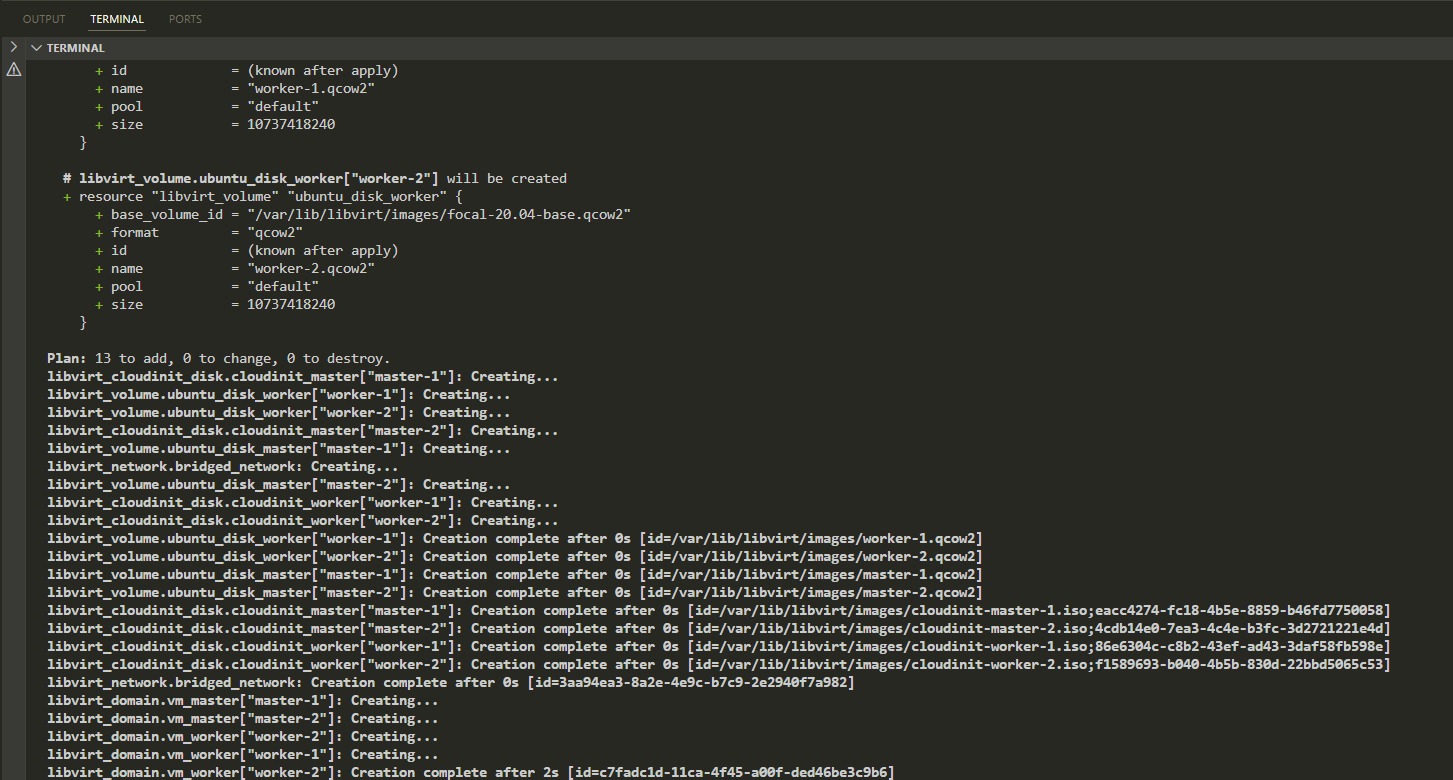
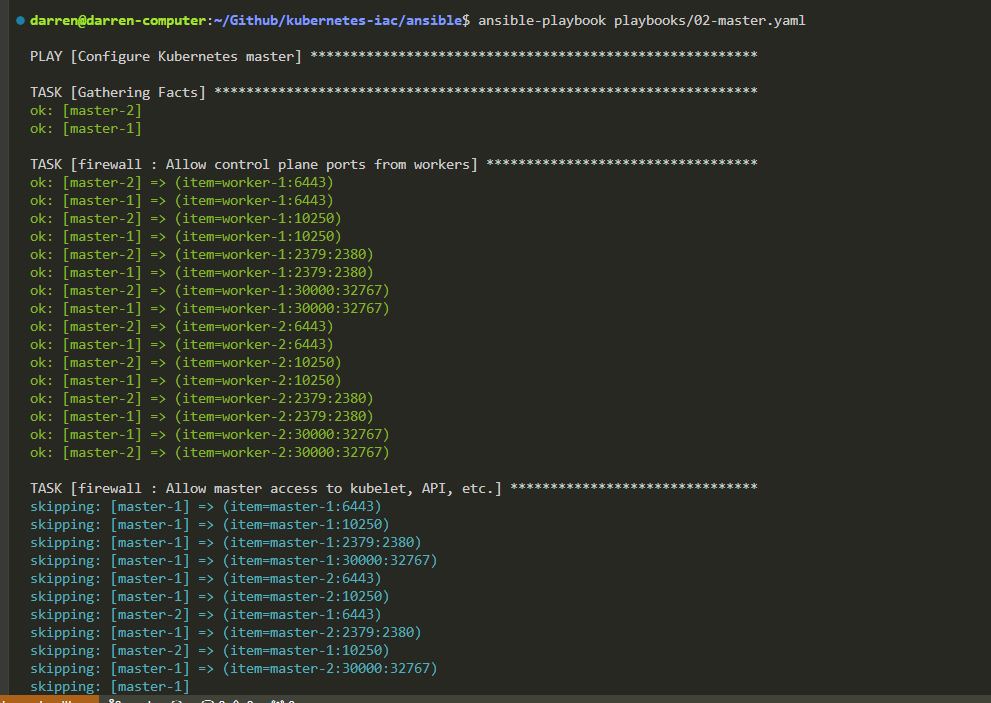
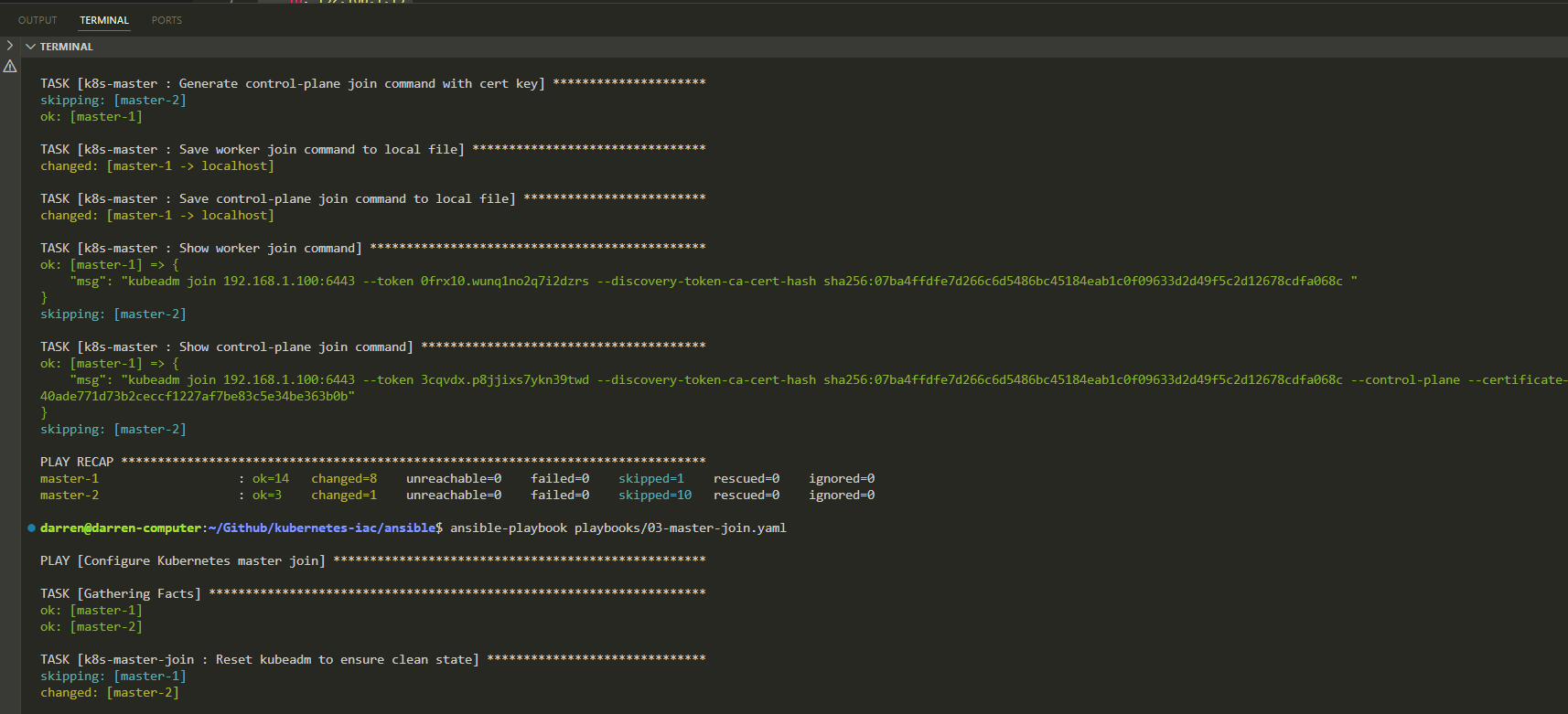
Results
- Terraform (Infrastructure Provisioning)
- Ansible (Configuration Management)
- Kubernetes Cluster