This guide documents a hands-on approach to migrating Docker Compose projects to Kubernetes. It outlines everything from fundamental concepts to practical examples—ideal for homelabbers, DevOps engineers, or anyone scaling from local dev to production-grade clusters.
Introduction
Understanding Kubernetes Prerequisites
Kubernetes is built with a “stateless-first” mindset, and this changes how we deploy applications compared to Docker Compose.
- Stateless-First Deployment — Pods can be killed and rescheduled at any time.
- Stateful Apps → StatefulSet — Use StatefulSet for apps needing persistent storage like databases or queues.
- Secrets — Use
Secretobjects to store sensitive data (e.g., credentials, tokens). - Redundancy — Always set
replicas > 1for HA deployments. - Health Probes — Use
livenessProbeandreadinessProbefor production workloads. - Namespaces — Use one namespace per project/repository.
Secrets in Kubernetes doesn't mean that it's encrypted. In a production-level cluster, you should enable encryption at rest (KMS) and integrate a credential manager like Vault or AWS Secrets Manager.
Docker to Kubernetes Concept Mapping
| Concept | Docker Compose | Kubernetes |
|---|---|---|
| Service Discovery | depends_on + container name | DNS: svc-name.namespace.svc.cluster.local |
| Networking | Shared bridge network | CNI (Container Network Interface) |
| Volumes | volumes: | PVC, PV, emptyDir |
| Env & Secrets | environment: | ConfigMap & Secret |
| Port Exposure | ports: "8080:80" | Service & optionally Ingress |
| Healthchecks | healthcheck: | livenessProbe, readinessProbe |
Kompose (Optional)
Kompose is a tool that converts docker-compose.yml to Kubernetes manifests. Use it for fast prototyping, but refactor manually for production:
- Move sensitive values to
Secret - App configs to
ConfigMap - Add
resources.limitsto containers - Define PersistentVolumeClaim sizes for volume paths
Conversion Examples
Simple Docker Compose
Docker Compose
# simple-docker-compose.yml
version: '3.8'

services:
  web:
    image: nginx:latest
    ports:
      - "8080:80"
    volumes:
      - ./html:/usr/share/nginx/html
    restart: unless-stopped
image:nginx:latest→ Can be changed in the Kubernetes manifestports:8080:80→ Exposes container port 80 to host port 8080volumes: Mounts local./htmldirectory to/usr/share/nginx/htmlinside the containerrestart:unless-stopped→ Not applicable in Kubernetes, userestartPolicy: Alwaysinstead
Migrate to Kubernetes
If in doubt, always refer to Kubernetes Documentation for objects and specifications
Deployment
apiVersion: apps/v1
kind: Deployment
metadata:
  name: web
spec:
  replicas: 2
  selector:
    matchLabels:
      app: web
  template:
    metadata:
      labels:
        app: web
    spec:
      containers:
        - name: nginx
          image: ghcr.io/your-org/nginx-html:latest
          ports:
            - containerPort: 80
Service
apiVersion: v1
kind: Service
metadata:
  name: web-service
spec:
  selector:
    app: web
  ports:
    - protocol: TCP
      port: 80        # Service Port
      targetPort: 80  # Container Port
  type: ClusterIP     # Options: ClusterIP | NodePort | LoadBalancer
Volume Strategy
“How should we manage volumes? Should we use them or bake content into the image? Here’s how to decide:”
Option 1 : Skip Mounting – Bake Static Files into the Image A better option for my use case (which is infrequent file changes) is to Bake the static files into the image due to these following reasons:
- Even though the container grows in size, using PVC and InitContainer introduces complexity, making it harder to manage, scale, and monitor.
- It is better for GitOps, because we do not need to touch any infra-related stuff at deployment
“Build content into container images for Immutable Artifacts, PVC is unnecessary for static content. Keep infra and deployment declarative via GitOps tools like ArgoCD or Flux.”
Option 2 : Use PVC + InitContainer (Good for frequent files changes)
PVC
apiVersion: v1
kind: PersistentVolumeClaim
metadata:
  name: html-pvc
spec:
  accessModes:
    - ReadWriteOnce
  # storageClassName: # if storageClass is available (kubectl get storageclass)
  resources:
    requests:
      storage: 1Gi
InitContainer
apiVersion: apps/v1
kind: Deployment
metadata:
  name: nginx-static
spec:
  replicas: 1
  selector:
    matchLabels:
      app: nginx-static
  template:
    metadata:
      labels:
        app: nginx-static
    spec:
      volumes:
        - name: html-volume
          persistentVolumeClaim:
            claimName: html-pvc

      initContainers:
        - name: git-clone
          image: alpine/git
          command: ["/bin/sh", "-c"]
          args:
            - |
              git clone --depth=1 https://github.com/your-org/your-repo.git /tmp/html && \
              cp -r /tmp/html/html/* /data/
          volumeMounts:
            - name: html-volume
              mountPath: /data

      containers:
        - name: nginx
          image: nginx:latest
          ports:
            - containerPort: 80
          volumeMounts:
            - name: html-volume
              mountPath: /usr/share/nginx/html
Option 3 : Content Delivery Network (Best Choice) – If the program made by the developer depends on a CDN, it is the best choice since it eliminates both cons from two methods above, this could mean:
- We do not need to manage PVC to place static content.
- Static files are fetched from a delivery network, we do not need to store it to the container.
Advanced Docker Compose
Docker Compose Setup
Docker Compose
# advanced-docker-compose.yml
version: '3.8'

services:
  app:
    build:
      context: ./app
      dockerfile: Dockerfile
    container_name: myapp
    environment:
      - DB_HOST=db
      - REDIS_HOST=redis
      - APP_ENV=production
    ports:
      - "3000:3000"
    volumes:
      - app-data:/usr/src/app/data
    depends_on:
      - db
      - redis
    healthcheck:
      test: ["CMD", "curl", "-f", "http://localhost:3000/health"]
      interval: 30s
      timeout: 10s
      retries: 5
    networks:
      - backend
      - frontend
    restart: always

  db:
    image: postgres:15
    container_name: postgres-db
    environment:
      POSTGRES_USER: ${POSTGRES_USER}
      POSTGRES_PASSWORD: ${POSTGRES_PASSWORD}
      POSTGRES_DB: mydatabase
    volumes:
      - db-data:/var/lib/postgresql/data
    networks:
      - backend
    restart: unless-stopped

  redis:
    image: redis:7
    container_name: redis-cache
    command: redis-server --appendonly yes
    volumes:
      - redis-data:/data
    networks:
      - backend
    restart: unless-stopped

  nginx:
    image: nginx:latest
    container_name: nginx-proxy
    ports:
      - "80:80"
    volumes:
      - ./nginx/nginx.conf:/etc/nginx/nginx.conf:ro
    depends_on:
      - app
    networks:
      - frontend
    restart: unless-stopped

volumes:
  db-data:
  redis-data:
  app-data:

networks:
  backend:
  frontend:
Environment Variables
# .env
POSTGRES_USER=admin
POSTGRES_PASSWORD=securepassword
Folder Structure
.
├── docker-compose.yml
├── .env
├── app/
│   ├── Dockerfile
│   └── src/
├── nginx/
│   └── nginx.conf
Kubernetes Conversion
- All resources are assumed to be namespaced in
advanced-app
Secrets
- Refer to the Secret in Kubernetes section below - The environment variable will be a stored Secret Object# .env
POSTGRES_USER=admin
POSTGRES_PASSWORD=securepassword
# /home/advanced-app
kubectl create secret generic postgres-secret \
-n advanced-app \
--from-env-file=.env
ConfigMap
-> a place to store application configuration, non-sensitive data should be stored here for application setting purposes- Look at the
app-config.datasection, the host uses Kubernetes local DNS to call the respective service- DB_HOST: db.advanced-app.svc.cluster.local
- REDIS_HOST: redis.advanced-app.svc.cluster.local
- Docker uses a single-network bridge which is why we reference it using the service names, Kubernetes is multi-container orchestrator which uses CNI + CoreDNS
apiVersion: v1
kind: ConfigMap
metadata:
name: app-config
namespace: advanced-app
data:
DB_HOST: db.advanced-app.svc.cluster.local
REDIS_HOST: redis.advanced-app.svc.cluster.local
APP_ENV: production
- Configurations like
nginx.confcan also be placed in ConfigMap, eliminating the node-dependent hostPath option and the additional benefit of namespace isolation
apiVersion: v1
kind: ConfigMap
metadata:
name: nginx-config
namespace: advanced-app
data:
nginx.conf: |
user nginx;
worker_processes auto;
error_log /var/log/nginx/error.log warn;
pid /var/run/nginx.pid;
events {
worker_connections 1024;
}
http {
include /etc/nginx/mime.types;
default_type application/octet-stream;
log_format main '$remote_addr - $remote_user [$time_local] "$request" '
'$status $body_bytes_sent "$http_referer" '
'"$http_user_agent" "$http_x_forwarded_for"';
access_log /var/log/nginx/access.log main;
sendfile on;
keepalive_timeout 65;
server {
listen 80;
server_name localhost;
location / {
proxy_pass http://app-service:3000;
proxy_set_header Host $host;
proxy_set_header X-Real-IP $remote_addr;
proxy_set_header X-Forwarded-For $proxy_add_x_forwarded_for;
proxy_set_header X-Forwarded-Proto $scheme;
}
}
}
Persistent Volume Claims
apiVersion: v1
kind: PersistentVolumeClaim
metadata:
name: db-data
namespace: advanced-app
spec:
accessModes: ["ReadWriteOnce"]
resources:
requests:
storage: 1Gi
---
apiVersion: v1
kind: PersistentVolumeClaim
metadata:
name: redis-data
namespace: advanced-app
spec:
accessModes: ["ReadWriteOnce"]
resources:
requests:
storage: 500Mi
---
apiVersion: v1
kind: PersistentVolumeClaim
metadata:
name: app-data
namespace: advanced-app
spec:
accessModes: ["ReadWriteOnce"]
resources:
requests:
storage: 1Gi
Deployment Apps
apiVersion: apps/v1
kind: Deployment
metadata:
name: app
namespace: advanced-app
spec:
replicas: 2
selector:
matchLabels:
app: app
template:
metadata:
labels:
app: app
spec:
containers:
- name: app
image: your-org/your-app:latest
envFrom:
- configMapRef:
name: app-config
- secretRef:
name: postgres-secret
volumeMounts:
- name: app-data
mountPath: /usr/src/app/data
ports:
- containerPort: 3000
readinessProbe:
httpGet:
path: /health
port: 3000
initialDelaySeconds: 10
periodSeconds: 10
volumes:
- name: app-data
persistentVolumeClaim:
claimName: app-data
Deployment PostgreSQL
apiVersion: apps/v1
kind: Deployment
metadata:
name: db
namespace: advanced-app
spec:
selector:
matchLabels:
app: db
template:
metadata:
labels:
app: db
spec:
containers:
- name: postgres
image: postgres:15
env:
- name: POSTGRES_USER
valueFrom:
secretKeyRef:
name: postgres-secret
key: POSTGRES_USER
- name: POSTGRES_PASSWORD
valueFrom:
secretKeyRef:
name: postgres-secret
key: POSTGRES_PASSWORD
- name: POSTGRES_DB
value: mydatabase
volumeMounts:
- name: db-storage
mountPath: /var/lib/postgresql/data
volumes:
- name: db-storage
persistentVolumeClaim:
claimName: db-data
Deployment Redis
apiVersion: apps/v1
kind: Deployment
metadata:
name: redis
namespace: advanced-app
spec:
selector:
matchLabels:
app: redis
template:
metadata:
labels:
app: redis
spec:
containers:
- name: redis
image: redis:7
args: ["redis-server", "--appendonly", "yes"]
volumeMounts:
- name: redis-storage
mountPath: /data
volumes:
- name: redis-storage
persistentVolumeClaim:
claimName: redis-data
Deployment NGINX
apiVersion: apps/v1
kind: Deployment
metadata:
name: nginx
namespace: advanced-app
spec:
selector:
matchLabels:
app: nginx
template:
metadata:
labels:
app: nginx
spec:
containers:
- name: nginx
image: nginx:latest
ports:
- containerPort: 80
volumeMounts:
- name: nginx-config
mountPath: /etc/nginx/nginx.conf
subPath: nginx.conf
# Mounts the nginx.conf from ConfigMap as a file inside /etc/nginx/
volumes:
- name: nginx-config
configMap:
name: nginx-config
Services
apiVersion: v1
kind: Service
metadata:
name: app-service
spec:
selector:
app: app
ports:
- port: 3000
targetPort: 3000
type: ClusterIP
---
apiVersion: v1
kind: Service
metadata:
name: db
spec:
selector:
app: db
ports:
- port: 5432
targetPort: 5432
type: ClusterIP
---
apiVersion: v1
kind: Service
metadata:
name: redis
spec:
selector:
app: redis
ports:
- port: 6379
targetPort: 6379
type: ClusterIP
---
apiVersion: v1
kind: Service
metadata:
name: nginx
spec:
selector:
app: nginx
ports:
- port: 80
targetPort: 80
nodePort: 30080
type: NodePort
- In this application, the database uses Pod and PVC, in production environment usually the database is seperated to another dedicated database instance or VM
- PostgreSQL as an example, we need to configure
pg_hba.confto allow IPv4 traffic to certain Kubernetes nodes
- PostgreSQL as an example, we need to configure
- We would need a StatefulSet to deploy PostgreSQL in Kubernetes, but for simplicity’s sake we use Deployment
Quickstart
- Below is a foundational YAML used to deploy and expose a service
- Make sure to add the required
Secretsbefore applying the manifest file below
apiVersion: apps/v1
kind: Deployment
metadata:
name: calendar-app
namespace: calendar-app
spec:
replicas: 3
selector:
matchLabels:
app: calendar-app
template:
metadata:
labels:
app: calendar-app
spec:
containers:
- name: calendar-app
image: registry.lgkentang.com/lgk/calendar-app
imagePullPolicy: Always
workingDir: /usr/src/app
ports:
- containerPort: 6666
command: ["npm"]
args: ["start"]
envFrom:
- secretRef:
name: calendar-app-secret
imagePullSecrets:
- name: registry-credential
---
apiVersion: v1
kind: Service
metadata:
name: calendar-app
spec:
type: NodePort
ports:
- protocol: TCP
port: 8484
targetPort: 6666
selector:
app: calendar-app
Kubernetes Concepts
Secret in Kubernetes
Secrets should not be placed in any repositories or container images as they expose it directly.
Types of Secrets:
- Docker Registry Secret (Useful for Private Docker Registry usage)
- Generic (common text)
- TLS
Docker Registry
kubectl create secret docker-registry my-registry-secret \
--docker-server=REGISTRY_URL \
--docker-username=YOUR_USERNAME \
--docker-password=YOUR_PASSWORD \
--docker-email=YOUR_EMAIL \
-n YOUR_NAMESPACE
- Environment Variables (generic)
- Take advantage of the
--from-env-fileoption to easily create a secret in environment variable fashion
# /home/calendar-app
root@master1:/home# vi .env
# .env
POSTGRES_USER=admin
POSTGRES_PASSWORD=securepassword
# /home/calendar-app
root@master1:/home# kubectl create secret \
generic calendar-app-env -n calendar-app \
--from-env-file=.env
calendar-app-env-> secret name-n calendar-app-> target namespace--from-env-file=-> all KV pairs in.envare passed as KV as SecretsIn deployment, we just need to append it as envFrom
    spec:
      containers:
      - name: calculator-app
        image: registry.lgkentang.com/lgk/calculator-app
        imagePullPolicy: Always
        workingDir: /usr/src/app
        ports:
        - containerPort: 6666
        command: ["npm"]
        args: ["start"]
        envFrom:
          - secretRef:
              name: calculator-app-secret
      imagePullSecrets:
      - name: registry-credential
Liveness & Readiness Probes
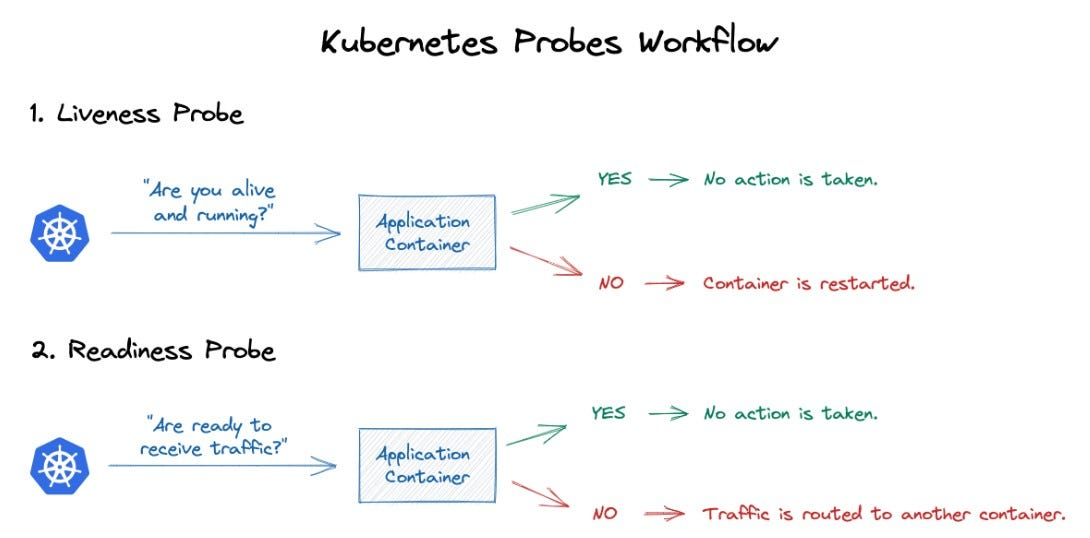
- Docker uses HEALTHCHECK which only checks the status of the container
- Kubernetes have Liveness Probe that is used to check and RESTART the container automatically
Docker Compose Example:
# docker-compose.yml
version: "3.9"
services:
  web:
    image: nginx:alpine
    ports:
      - "8080:80"
    healthcheck:
      test: ["CMD", "wget", "-q", "--spider", "http://localhost:80"]
      interval: 30s
      timeout: 5s
      retries: 3
      start_period: 5s
Kubernetes Example:
apiVersion: v1
kind: Pod
metadata:
  name: nginx-pod
spec:
  containers:
    - name: nginx
      image: nginx:alpine
      ports:
        - containerPort: 80
      livenessProbe:
        httpGet:
          path: /
          port: 80
        initialDelaySeconds: 5     # start_period
        periodSeconds: 30          # interval
        timeoutSeconds: 5          # timeout
        failureThreshold: 3        # retries
Mounting .env vs Env Injection
- Sometimes the application we are trying to deploy are developed with two
.envplacements, which are:
- Needs
.envfile inside the directory The developed application always refer to the.envin the sameWORKDIR, so we use volume mount to solve this problem
- Take the key value from the Secret that we have created
- Mount it as .env in the Volume
    spec:
      hostname: calculator-app
      imagePullSecrets:
        - name: registry-credential
      containers:
        - name: calculator-app
          image: registry.lgkentang.com/lgk/calculator-app
          ports:
            - containerPort: 80
          volumeMounts:
            - name: env-volume
              mountPath: /app/.env
              subPath: .env
      volumes:
        - name: env-volume
          secret:
            secretName: calculator-app-secret
- Inject
.envdirectly into the container Program reads key value data directly from the container, this is a cleaner way and usually the app already knows how to reference the env data directly from the container
    spec:
      hostname: calculator-app
      imagePullSecrets:
        - name: registry-credential
      containers:
        - name: calculator-app
          image: registry.lgkentang.com/lgk/calculator-app
          envFrom:  # ambil env dari secret
          - secretRef:
              name: calculator-app-secret
          ports:
            - containerPort: 3040
          workingDir: /usr/src/app
          command: ["npm", "run", "start:prod"]
          volumeMounts:
          - name: timezone
            mountPath: /etc/timezone
            readOnly: true
          - name: localtime
            mountPath: /etc/localtime
            readOnly: true
- To know whether the app env needs to be injected or to be mounted as a file is just to try each method, we never know what the developer is trying to develop
- Docker’s best practice is not to COPY .env into the Dockerfile, this creates an exposed secret in the image, hence it is better to inject directly into the container since it is destroyed upon container removal